Jon Ortberg has written a number of books, some of which populate by bookshelves. among the ones I've read are: If you want to walk on water you've got to get out of the boat, Everybody's normal 'til you get to know them, The life you've always wanted and God is closer than you think. In one of these he quotes that most famous of maritime philosophers, Popeye the sailor-man, who said, "I am what I am." Actually he said, "I yam what I yam," accourding to Ortberg, but's it's difficult to write with Popeye's accent!
How many times have you heard yourself, or someone else, say something similar? We use it all the time to excuse our behaviour, to excuse our failure or simply to avoid change. And yet, all the time we make excuses we avoid responsibility. We go on doing the same old things because we believe that we simply can't help it. It's who we are. It's what we do.
But wait a minute, doesn't the Bible offer us hope? Doesn't the Bible hold out the potential for change? Isn't the core message of God's great story that while it may be true that I am what I am, it's also true that I am not all that I could be?
Perhaps we need to remember that we are best defined by reference to God's great and redeeming love for us. We are not defined by our failure and failings. In God's hands, our potential s unlimited, the possibilities are endless and the opportunities inexhaustible.
Tuesday, September 11, 2007


Thursday, September 06, 2007
Clickbook
 Clickbook adds a "virtual printer" rather like many of the pdf creator programs you can get. If you don't have a pdf generator, then you could try PDF995 which is what I use. But there are lots to choose from. You get single click access in Windows applications and there's a MAC OSX version too.
When activated, Clickbook allows you to choose the style of output you want and then configures your printer to give you that output. And there are a lot of styles, although no Pocketmod style that I could see. So, for example, I tried printing my contact list from Outlook in the form of pages for my Filofax planner. With a little work form the guillotine and my hole punch, I had all my contacts on paper and with my diary. Something I've been wanting to do for many years but never been able to crack it.
If you're printer has duplex, it will use that too.
I have a Samsung CPL500 and Clickbook adjusted the output to match the paper and the auto-duplexing. Very neat.
I'm using the 15 day trial version, but I'd seriously consider buying the full version if my initial test runs are anything to go by.
Tuesday, September 04, 2007

Managing change
I was at an Inset (In Service Training) day at the beginning of the week and came across this:
Vision + Skills + Incentives + Resources + Action Plan
= Change
Skills + Incentives + Resources + Action Plan
= Confusion
Vision + Incentives + Resources + Action Plan
= Anxiety
Vision + Skills + Resources + Action Plan
= Resistance
Vision + Skills + Incentives + Action Plan
= Frustration
Vision + Skills + Incentives + Resources
= Treadmill
Vision + Skills + Incentives + Resources + Action Plan
= Change
Skills + Incentives + Resources + Action Plan
= Confusion
Vision + Incentives + Resources + Action Plan
= Anxiety
Vision + Skills + Resources + Action Plan
= Resistance
Vision + Skills + Incentives + Action Plan
= Frustration
Vision + Skills + Incentives + Resources
= Treadmill
Saturday, September 01, 2007
My wedding talk
It's been a busy few weeks, what with one thing and another. What's made it unusual is that August is typically quite quiet as I wind down and take the opportunity to rest and relax a little.
This August has been busier than usual, with two weddings and two funerals, all in 17 days. Now I know that's not a lot for many a minister, but it's more weddings that I usually do and the funerals are normally spread out over the year.
Anyway today was the second wedding and although technically it's September, it felt like August. I have several wedding talks, but I tend to revert to one in particular. It's not wholly original to me, the basics of the idea were shared with me by a older fellow minister. The outline of the talk is this:
3 great questions to ask.
1. Where do you want this marriage to go?
2. How will you get there?
3. Are you willing to do whatever it takes to reach that place?
21 important words for the journey
First six: I am sorry, I was wrong
Next five: How can I help you?
Then four: What do you think?
Now three: I love you
Two : Thank you
One to go: We
I guess, looking at my diary, I won't be using this until October next year, but then again I didn't think I was going to use it this year at all!
This August has been busier than usual, with two weddings and two funerals, all in 17 days. Now I know that's not a lot for many a minister, but it's more weddings that I usually do and the funerals are normally spread out over the year.
Anyway today was the second wedding and although technically it's September, it felt like August. I have several wedding talks, but I tend to revert to one in particular. It's not wholly original to me, the basics of the idea were shared with me by a older fellow minister. The outline of the talk is this:
3 great questions to ask.
1. Where do you want this marriage to go?
2. How will you get there?
3. Are you willing to do whatever it takes to reach that place?
21 important words for the journey
First six: I am sorry, I was wrong
Next five: How can I help you?
Then four: What do you think?
Now three: I love you
Two : Thank you
One to go: We
I guess, looking at my diary, I won't be using this until October next year, but then again I didn't think I was going to use it this year at all!
Friday, August 31, 2007
Have you discovered Pocketmod?
As I continue to work with Thinking Rock, I discovered the other day that it can produce a report in a format called "Pocketmod". Now I'd never come across Pocketmod before so, intrigued as I was, I ran the report and was quite surprised by what it produced. A quick search of the internet found the pocketmod website and it all began to make sense.
If you don't know, pocketmod is simply a way of printing out useful things which you then fold to produce a small booklet to carry in your pocket. One or two people have produced templates, but I want to be able to do a little more and so designed my own pocketmod print.
Taking my Next actions report that I've already translated into a Word document in order to be able to put it on my PDA, I've simply created a template in Publisher into which I can paste the data form the report. Because Publisher allows you to have text upside by inverting the text boxes, you can get an easy to fold booklet of all your next actions or any other form of list you might want.
Here's my pocketmod of next actions.

If you don't know, pocketmod is simply a way of printing out useful things which you then fold to produce a small booklet to carry in your pocket. One or two people have produced templates, but I want to be able to do a little more and so designed my own pocketmod print.
Taking my Next actions report that I've already translated into a Word document in order to be able to put it on my PDA, I've simply created a template in Publisher into which I can paste the data form the report. Because Publisher allows you to have text upside by inverting the text boxes, you can get an easy to fold booklet of all your next actions or any other form of list you might want.
Here's my pocketmod of next actions.

To be swallowed up in eternal life
But we continue to preach because we have the same kind of faith the psalmist had when he said, “I believed in God, so I spoke.” We know that God, who raised the Lord Jesus, will also raise us with Jesus and present us to himself together with you. All of this is for your benefit. And as God’s grace reaches more and more people, there will be great thanksgiving, and God will receive more and more glory.
That is why we never give up. Though our bodies are dying, our spirits are being renewed every day. For our present troubles are small and won’t last very long. Yet they produce for us a glory that vastly outweighs them and will last forever! So we don’t look at the troubles we can see now; rather, we fix our gaze on things that cannot be seen. For the things we see now will soon be gone, but the things we cannot see will last forever.
For we know that when this earthly tent we live in is taken down (that is, when we die and leave this earthly body), we will have a house in heaven, an eternal body made for us by God himself and not by human hands. We grow weary in our present bodies, and we long to put on our heavenly bodies like new clothing. For we will
put on heavenly bodies; we will not be spirits without bodies. While we live in these earthly bodies, we groan and sigh, but it’s not that we want to die and get rid of these bodies that clothe us. Rather, we want to slip into our new bodies so that these dying bodies will be swallowed up by everlasting life. God himself has prepared us for this, and as a guarantee he has given us his Holy Spirit.So we are always confident, even though we know that as long as we live in these bodies we are not at home with the Lord. For we live by believing and not by seeing. Yes, we are fully confident, and we would rather be away from these earthly bodies, for then we will be at home with the Lord. So whether we are here in this body or away from this body, our goal is to please him. For we must all stand before Christ to be judged. We will each receive whatever we deserve for the good or evil we have done in this earthly body.
This was New Testament reading today and it blew me away. This is Paul at his eloquent best, and personally I found it deeply moving today.
Look how he begins, reminding us that our faith is a faith shared through the generations and the basis that it gives for our future hope. Look at the foundation of our endurance-the grace of God drawing more and more people into his kingdom. “That is why,” says Paul, “we never give up.” Even though everything around might scream, “give up”, our spirits are renewed and we go on, looking forward into the future that God has planned for us. An eternal future that puts our present troubles in perspective.
And here’s a great phrase, “We want to slip into our new bodies so that these dying bodies will be swallowed up by everlasting life.” That’s a great picture. One day eternal life will consume us.
Out of all this comes our desire to please God, and so “we live by believing and not by seeing.”
Maybe it’s just today and the spiritual place in which I find myself, but these words seem to soar with a majesty that draws me into thanksgiving for the goodness, the grace, the wonder of all that God has done for me, is doing for, and will do for me.
An opportunity we can't afford to miss
For the last couple of years we've been watching the progress of a project to build a new community just two miles from our village. Almost 10,000 homes will be built over the next 10 years or so and currently the infrastructure is being prepared. The first residents are expected to move in some time in 2008.
By comparison the village in which we currently and minister has 300 homes and the nearby village of Shortstown has about 1,000 homes (set to double in size in the next year or so). It seems obvious to me, and to others at church, that this is a God-given opportunity to engage with a new community from it's very beginnings. An opportunity to do mission in new ways with new people.
This has demanded a lot of thought and prayer about what this might mean, and I believe it's really important that we get committed Christians into the community as early as we can. This is an opportunity to serve a new, emerging community. It's an opportunity to contribute to the DNA of a neighbourhood, a village, even a town from its beginnings and as it grows.
Will you pray with us that God will bring to these new communities Christians who will connect with their neighbours, Christians who will be able to connect with us and partner with us in reaching this new community?
If you're interested in what's happening in these developments, you can visit the main developers site here.
By comparison the village in which we currently and minister has 300 homes and the nearby village of Shortstown has about 1,000 homes (set to double in size in the next year or so). It seems obvious to me, and to others at church, that this is a God-given opportunity to engage with a new community from it's very beginnings. An opportunity to do mission in new ways with new people.
This has demanded a lot of thought and prayer about what this might mean, and I believe it's really important that we get committed Christians into the community as early as we can. This is an opportunity to serve a new, emerging community. It's an opportunity to contribute to the DNA of a neighbourhood, a village, even a town from its beginnings and as it grows.
Will you pray with us that God will bring to these new communities Christians who will connect with their neighbours, Christians who will be able to connect with us and partner with us in reaching this new community?
If you're interested in what's happening in these developments, you can visit the main developers site here.
What kind of thinker am I?
The BBC website has a section devoted the Leonardo da Vinci, quite why I'm not sure, but it does have another of those wonderful personality tests to work out what kind of thinker you are.
My results were:
Take the test yourself at the BBC website.
My results were:
Sad that "church leader" doesn't fall into career choices. Perhaps, having inhabited both the scientific world of research and development and the "humanities" world of theology, I'm too complex a thinker to fit neatly into a category. Well I can only hope!You are a Linguistic Thinker
Linguistic thinkers:
Tend to think in words, and like to use language to express complex ideas.
Are sensitive to the sounds and rhythms of words as well as their meanings.
Like linguistic thinkers, Leonardo made meticulous descriptions in his journals. He also made an effort to learn Latin - a foreign language
Other linguistic thinkers include William Shakespeare, Sylvia Plath, Anne Frank; Careers which suit linguistic thinkers include: Journalist, Librarian, Salesperson, Proof-reader, Translator, Poet, Lyricist
Take the test yourself at the BBC website.
Thursday, August 30, 2007
The weekly review

It's a very comprhensive list, and not everything would apply to everyone, but it might be a place to start if you need a plan (like me!)
You can find the post here.
Organising actions and projects
As I continue to develop my GTD-based system for organising my life, I find I have to keep making adjustments and trying new things. This is to be expected, and I wouldn't have assumed that I'd drop into a system that did everything the right way for me first time.
One of the things I've noticed is how easily it is to write an action that is actually a project. When you push yourself to consider what the "next action" is, the absolutely next thing you must do to take a step forward, I at least begin to see that more things are projects than they are single actions. I do have single actions: "Send Matt the contact details fro the architect", is a single action, but I also have some things that look like single actions, but quickly emerge as projects in their own right. For example, I created an action to build a new team for a particular ministry at church. I very quickly realised that there were several steps that needed to be completed in order to build that team, so I set about turning this apparently single action into a project and then I worked out what the true "next action" needed to be.
With this in mind I took a long look at all my "inactive" actions, actions that do not have a scheduled date or a delegated flag, or even a "Do ASAP" flag for them. I decided that I needed to organise these, which I do as part of my regular review. Some of these actions are inactive because they are future events, but I don't want them to drop off my radar so-to-speak, so I keep them in my current projects and actions. There are some actions which I've completed, but in fact are not completed. I know that sounds crazy but for example I have a task to connect with another local Christian worker. This I've done through a 'phone call, but I got their answering machine. So I've half done the task because I'm waiting for a response. These inactive tasks, or incomplete tasks clutter my actions list (remember I'm using Thinking Rock). So, I decided to use some gtd terminology and delegate these tasks to a series of @x tags. So I now have tags for actions that are waiting for a response (the classic @waiting for gtd tag), @review, for actions I need to pay attention to and schedule at some point, @maybe for tasks that are, well "maybe tasks", you get the point.
What's nice about doing this is that I can filter my actions by "delegated" and sort them once filtered. This allows me to see at a glance what tasks are waiting for something or someone else and I can decide how to follow that up.
I'm conscious that I may be over complicating things, so I'll have to test drive this for a while and see if it's a help for a hindrance, but I thougt I'd drop the idea into the mix.
One of the things I've noticed is how easily it is to write an action that is actually a project. When you push yourself to consider what the "next action" is, the absolutely next thing you must do to take a step forward, I at least begin to see that more things are projects than they are single actions. I do have single actions: "Send Matt the contact details fro the architect", is a single action, but I also have some things that look like single actions, but quickly emerge as projects in their own right. For example, I created an action to build a new team for a particular ministry at church. I very quickly realised that there were several steps that needed to be completed in order to build that team, so I set about turning this apparently single action into a project and then I worked out what the true "next action" needed to be.
With this in mind I took a long look at all my "inactive" actions, actions that do not have a scheduled date or a delegated flag, or even a "Do ASAP" flag for them. I decided that I needed to organise these, which I do as part of my regular review. Some of these actions are inactive because they are future events, but I don't want them to drop off my radar so-to-speak, so I keep them in my current projects and actions. There are some actions which I've completed, but in fact are not completed. I know that sounds crazy but for example I have a task to connect with another local Christian worker. This I've done through a 'phone call, but I got their answering machine. So I've half done the task because I'm waiting for a response. These inactive tasks, or incomplete tasks clutter my actions list (remember I'm using Thinking Rock). So, I decided to use some gtd terminology and delegate these tasks to a series of @x tags. So I now have tags for actions that are waiting for a response (the classic @waiting for gtd tag), @review, for actions I need to pay attention to and schedule at some point, @maybe for tasks that are, well "maybe tasks", you get the point.
What's nice about doing this is that I can filter my actions by "delegated" and sort them once filtered. This allows me to see at a glance what tasks are waiting for something or someone else and I can decide how to follow that up.
I'm conscious that I may be over complicating things, so I'll have to test drive this for a while and see if it's a help for a hindrance, but I thougt I'd drop the idea into the mix.
Wednesday, August 29, 2007
Airport extreme is go!
Ally, my daughter, and I have just set up our new network using an Airport Extreme base station. I have to say it was a bit nerve jingling, replacing a working system with an unknown one, but everything seems to be working fine. In fact it's working better than the system it replaced.
So, bring on the MacBook!!
So, bring on the MacBook!!
Tuesday, August 28, 2007
The Perfect Pastor
Came across this snippet while in the process of sorting out my filing system.
The Perfect Pastor
The results of a computerised survey indicate the perfect minister preaches exactly 15 minutes. He condemns sin but never upsets anyone. He works from 8:00am until midnight and is also the caretaker (janitor). He earns £50 a week, wears good clothes, buys good books, drives a good car, and gives about £50 a week to the poor.
He is 28 years old and has preached for 30 years. He has a burning desire to to work with teenagers and spends all his time with senior citizens.
The perfect minister smiles all the time with a straight face because he has a sense of humour that keeps him seriously dedicated to his work. He visits at least 15 people a day including families, shut-ins, and those in hospital.
He is always in his study when needed.
The Perfect Pastor
The results of a computerised survey indicate the perfect minister preaches exactly 15 minutes. He condemns sin but never upsets anyone. He works from 8:00am until midnight and is also the caretaker (janitor). He earns £50 a week, wears good clothes, buys good books, drives a good car, and gives about £50 a week to the poor.
He is 28 years old and has preached for 30 years. He has a burning desire to to work with teenagers and spends all his time with senior citizens.
The perfect minister smiles all the time with a straight face because he has a sense of humour that keeps him seriously dedicated to his work. He visits at least 15 people a day including families, shut-ins, and those in hospital.
He is always in his study when needed.
Blog action day

I came across this through another site via a blog entry elsewhere.... The internet is a wondrous place for "rabbit trails" of the unexpected!
Anyway, Blog Action Day (Oct.15th 2007) is for everyone who has something they want to say about the environment. It's a sort of mass action via the blogosphere. I'm going to take part and post some thoughts about the environment. It's an odd things but I actually studied environmental science back in the 70's when I went to university in Wales. It wasn't a particularly fashionable thing to do then, I actually applied to do biology. But when I saw the environmental studies course that was on offer, I knew it was what I wanted to do. It just really appealed. Ever since I've taken an interest in the environment although it has been an obsessive one.
Anyway, I just thought I'd mention it in case you wanted to get involved too.
Wednesday, August 22, 2007
Curing a slow computer
Just recently I've begun to notice how slow my computer was getting and, not wanting to jump through too many hoops to sort this out I did a little research. Now I know that all you tech. savvy folk out there will already know this, but then again there are plenty of people like me who haven't had, or taken, the time to find it out yet.
So, the first thing I did was run a thing called registry patrol. It doesn't seem to have done any harm to my system, and there was a noticeable improvement in some things. I know that it has had some poor reviews, and there may be a better tool out there, but this worked for me. I should also say that I regularly run spyware to clear out any nasty bits and pieces that have crept in through the firewall.
The other things I've done is reduce the number of desktop icons I have. I thought I'd go for the "no icons at all" approach, but decided against that because Anne, my wife might think there was something wrong if no icons were showing. I use a black background anyway, so it might look like the system had crashed! I now have only three icons on my desktop: "My computer", "Recycle Bin" and Unused Icons".
Things have improved a little, in fact I think they've improved a lot. All those icons take time to draw and therefore take up cpu power, diverting it away from other useful things like opening applications. And everything is still accessible through the menus.
So if you're experiencing some similar problems because you've added programs and applications and let them put an icon on the desktop, trying removing them and see if it makes a difference.
PS I also cleaned up the files and defragged the hard drive.
So, the first thing I did was run a thing called registry patrol. It doesn't seem to have done any harm to my system, and there was a noticeable improvement in some things. I know that it has had some poor reviews, and there may be a better tool out there, but this worked for me. I should also say that I regularly run spyware to clear out any nasty bits and pieces that have crept in through the firewall.
The other things I've done is reduce the number of desktop icons I have. I thought I'd go for the "no icons at all" approach, but decided against that because Anne, my wife might think there was something wrong if no icons were showing. I use a black background anyway, so it might look like the system had crashed! I now have only three icons on my desktop: "My computer", "Recycle Bin" and Unused Icons".
Things have improved a little, in fact I think they've improved a lot. All those icons take time to draw and therefore take up cpu power, diverting it away from other useful things like opening applications. And everything is still accessible through the
So if you're experiencing some similar problems because you've added programs and applications and let them put an icon on the desktop, trying removing them and see if it makes a difference.
PS I also cleaned up the files and defragged the hard drive.
Star posts
I thought I'd check out some of the blog posts that are "starred" in my Google Reader set up. It's an interesting mix! Here are five of my starred items.
In no particular order:
Is productivity contagious? raises that simple question. It asks whether we fall into the patterns around us and therefore also poses the question, for me as a leader, what kind of standard am I setting?
14 numbers your cell phone can't live without. This was fun. I wonder if "Your pastor" should be number 15?
Jim Wideman’s 3 Questions for Effectiveness and Efficiency. Unfortunately the link doesn't appear to be working for this one, so here's the gist of the entry.
the parable of bullhorn man Conrad was my New Testament tutor when I was doing my masters degree some 17 years ago (sorry Conrad!)
In no particular order:
Is productivity contagious? raises that simple question. It asks whether we fall into the patterns around us and therefore also poses the question, for me as a leader, what kind of standard am I setting?
14 numbers your cell phone can't live without. This was fun. I wonder if "Your pastor" should be number 15?
Jim Wideman’s 3 Questions for Effectiveness and Efficiency. Unfortunately the link doesn't appear to be working for this one, so here's the gist of the entry.
Jim Wideman recently shared 3 questions he often asks to improve the effectiveness and efficiency of his ministry:On missing Q… This a post by Jeff Noble, someone I've come to know and respect through the world of blogging. In this post Jeff shares four points about missional imagination gleaned form another blog which I also follow called churchrelevance.com.1. What am I doing that someone else can do?
Train yourself to regularly ask these questions. If you do, you will develop better leaders, be a better steward of your time, and consistently be improving your ministry.
2. What do I need to be doing that only I can do?
3. Is there a better way to do what we are doing?
the parable of bullhorn man Conrad was my New Testament tutor when I was doing my masters degree some 17 years ago (sorry Conrad!)
Love, above all else
I remember hearing about Tim Sanders Love is the killer app book when I was last at the Willow Creek Leadership Summit in Chicago. I was reminded of it when I read the opening of 1Corinthians 14, where Paul says, "Let love be your highest goal". A literal translation of the Greek might be "Pursue love", in other words go after it, make it a consuming passion, don't let anything else take the priority position that love should have amongst the range of spiritual gifts that are available to you.
Of the three that remain (1Cor.13:13), love is the greatest. Paul says they remain whilst all the other gifts that are so eagerly pursued, and trumpeted, will pass away. But love remains with hope and faith. You probably don't need me to remind you how often faith, hope and love come up in Paul's letters.
The question I'm asking myself is: "How do I purse love as my highest goal?" When I did ethics at college we studied various approaches to issues, one of which was always to do the most loving thing. The problem was defining what the most loving thing was. Everyone had a different perspective.
Perhaps, from a Christian perspective, the most loving thing is always going to be the thing that most honours God. It's the thing that Jesus would do if he had to make the decision. It would be the thing most full of grace and most reflective of his character. It would understand the predicament but always point to a better way. It wouldn't judge and condemn but rather forgive and restore. But there would also be a sense of challenge too (... go and sin no more {John 8:11})
It's a balance we find difficult to maintain. We worry that if we don't do something about discipline, then the church will fall apart; that if we don't root out sin, we'll be seen as condoning patterns of life that are are far from God's ideal.
So when I read Paul's words I ask myself: How did Jesus make love his goal? And then I see the shadow of the cross and suddenly my perspective changes.
For God so loved the world that he gave his one and only Son....
Of the three that remain (1Cor.13:13), love is the greatest. Paul says they remain whilst all the other gifts that are so eagerly pursued, and trumpeted, will pass away. But love remains with hope and faith. You probably don't need me to remind you how often faith, hope and love come up in Paul's letters.
The question I'm asking myself is: "How do I purse love as my highest goal?" When I did ethics at college we studied various approaches to issues, one of which was always to do the most loving thing. The problem was defining what the most loving thing was. Everyone had a different perspective.
Perhaps, from a Christian perspective, the most loving thing is always going to be the thing that most honours God. It's the thing that Jesus would do if he had to make the decision. It would be the thing most full of grace and most reflective of his character. It would understand the predicament but always point to a better way. It wouldn't judge and condemn but rather forgive and restore. But there would also be a sense of challenge too (... go and sin no more {John 8:11})
It's a balance we find difficult to maintain. We worry that if we don't do something about discipline, then the church will fall apart; that if we don't root out sin, we'll be seen as condoning patterns of life that are are far from God's ideal.
So when I read Paul's words I ask myself: How did Jesus make love his goal? And then I see the shadow of the cross and suddenly my perspective changes.
For God so loved the world that he gave his one and only Son....
Monday, August 20, 2007
Rediscovering my PDA
 A long time ago I had an ipaq. I liked my ipaq. The problem was that:
a. I couldn't easily see a week at a glance or a month.
b. It would lock up for no apparent reason and I couldn't get access to anything.
c. It didn't respond well to being driven over in the car park.
This last point was an accident, but it did demonstrate that a paper diary system is much quicker to restore, doesn't have battery failures at inconvenient moments, and is infinitely adaptable.
So it was that I reentered the digital PDA world last year with a little hesitation. I finally chose a Palm Tungsten E2. Loved by some, hated by an equal and opposite number and thereby causing the balance of the universe to remain intact. It is a fact that what one person finds a wonderful, life-enhancing tool, another finds to be the very antithesis of all that is good and wholesome.
Anyway, getting the Palm gave me a chance to reevaluate my relationship with paper and electronics. I have to say I still like paper, I still love writing with a foutain pen in my journal, I still love having a notebook to jot down ideas and other stuff, but I'm warming to my Palm.
Ever since I began to explore the basics of GTD, my Palm has taken on a whole new role in my life. Not only can I keep my task list up-to-date and take it with me wherever I go, I can keep all the other data up-to-date too. It's a laborious job writing 'phone numbers in my diary, the PDA makes it very easy. My Palm uses Documents to Go, which allows me to synchronise Word and Excel documents on my PDA and computer.
Thinking Rock, my GTD application, produces reports of actions and projects (to name just two). Because I'm not running the posh version of Documents to Go, I can't synchronise the pdf reports, but I can copy them into Word and then synchronise the resultant file. It take a little longer but it's not brain surgery.
So now I can have a regularly updated report on what needs to be done and what projects are on the go. The project file gets updated each week, and the actions as and when it's needed.
The other neat thing about having the PDA look after this is that I can label the tasks. That means I can view them by context (a GTD expression for where or with whom one completes an action) using the tags I've created. So on my Palm I have an easy way to see what calls I need to make, what errands I need to run and what books I want to read. It would take me an age to write all this stuff down for my paper system. I do keep a printed copy of actions in my diary, which I can use when I'm out, but the Palm is a better option.
I don't suppose I'll be ditching the paper and pen any time soon, but the combination of paper, pen and stylus is looking promising.
Software for creative writing
I've been looking for software that will let me outline ideas for a sermon series or even a book or a website or anything else that requires more than, or less than, the processes offered by the likes of Word. A standard word processor is fine for churning out letters and notes and even sermon outlines, but it's not very helpful for setting out the big picture of a series or even a stategy document. Take for example a series on "The heart". I did one of these a long time ago and if I used Word to do that the easiest way was to start each sermon idea on a new page. The problem was, that unless you used the indexing system and produced a contents page that you regularly refreshed, you never got to see the bigger picture of the overall series.
So I had a look for something that might help and I came across two pieces of software, one Windows and one for the Mac. Given that I'm going to buy a Mac in the autumn, my daughter graciously let me download Scrivener and play with it on her Mac mini. The Windows product I'm playing with is called Pagefour.
This is how Scrivener looks:
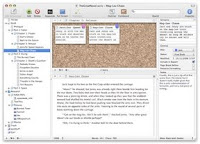 So far I have to say I'm really liking it. The cork-board is really useful and there are some very nice touches. I have a feeling this will become a standard part of my set-up when I migrate to Mac.
I'm thinking of writing a book, and Scrivener, like Pagefour, is expressly designed for this kind of task.
On the left of the screen you have all your pages and projects. You can edit them individually or, by selecting a group, you can edit them as a single document. On the cork board you can rearrange the index cards and your pages are rearrange too.
Pagefour is not quite so pretty, but function is more important. At the moment, because I'm living in two worlds, I'm playing with Scrivener to outline an idea for a book based on my recent foray into the world of getting organised. Having worked through David Allen's Getting Things Done, I wondered if there was a place for a book you could read in an hour to kick-start getting hold of all the disorganised stuff. Anyway, that's a good project to try out this kind of software.
In Pagefour, which looks like this:
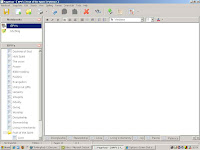 I'm setting out a major teaching series for the church. Having recently read The Connecting Church by Randy Frazee, I thought I'd look at setting out our core beliefs, practices and virtues, and try to work them into a series for Sundays.
In Pagefour you have a basic set-up with your list of notebooks top left and below that a list of pages and folders. Folders are useful because you can have a topic as a folder, which you can then break down into smaller pieces.
If you're involved in developing the teaching programme in any setting, I think either of these programs will be useful to you. I like being able to see the overall picture as well as the detail and these two applications let me do that.
You can get a free trial of either of them from the websites linked above. Neither is an expensive piece of software.
On a different topic, I wanted to include a screenshot with this post and wondered how I'd do that. I had a look for a screen capture program and found several, one of which I've downloaded but not installed yet because I found a really neat solution. As a Windows user, you can use the facility to capture a screenshot quite nicely.
Open the application you want to capture, press and then open an image editing application (I use Photoshop) and then paste the clipboard into a new image and hey presto an instant screen shot.
So I had a look for something that might help and I came across two pieces of software, one Windows and one for the Mac. Given that I'm going to buy a Mac in the autumn, my daughter graciously let me download Scrivener and play with it on her Mac mini. The Windows product I'm playing with is called Pagefour.
This is how Scrivener looks:
 So far I have to say I'm really liking it. The cork-board is really useful and there are some very nice touches. I have a feeling this will become a standard part of my set-up when I migrate to Mac.
I'm thinking of writing a book, and Scrivener, like Pagefour, is expressly designed for this kind of task.
On the left of the screen you have all your pages and projects. You can edit them individually or, by selecting a group, you can edit them as a single document. On the cork board you can rearrange the index cards and your pages are rearrange too.
Pagefour is not quite so pretty, but function is more important. At the moment, because I'm living in two worlds, I'm playing with Scrivener to outline an idea for a book based on my recent foray into the world of getting organised. Having worked through David Allen's Getting Things Done, I wondered if there was a place for a book you could read in an hour to kick-start getting hold of all the disorganised stuff. Anyway, that's a good project to try out this kind of software.
In Pagefour, which looks like this:
 I'm setting out a major teaching series for the church. Having recently read The Connecting Church by Randy Frazee, I thought I'd look at setting out our core beliefs, practices and virtues, and try to work them into a series for Sundays.
In Pagefour you have a basic set-up with your list of notebooks top left and below that a list of pages and folders. Folders are useful because you can have a topic as a folder, which you can then break down into smaller pieces.
If you're involved in developing the teaching programme in any setting, I think either of these programs will be useful to you. I like being able to see the overall picture as well as the detail and these two applications let me do that.
You can get a free trial of either of them from the websites linked above. Neither is an expensive piece of software.
On a different topic, I wanted to include a screenshot with this post and wondered how I'd do that. I had a look for a screen capture program and found several, one of which I've downloaded but not installed yet because I found a really neat solution. As a Windows user, you can use the
Open the application you want to capture, press
Saturday, August 18, 2007
Making a start in self-organisation
Jeff said:
Ooooo aaaaah. More more..! ;)Still trying to find time to
take this plunge. I know that sounds like I'm not committed to wanting to be
organized, but give me a first step here...
So here’s my first step.
1. Plan the date you’re gong to do this. Don’t think about it, plan it, make the decision to deal with all the stuff and set the time aside to do it. If necessary, plan several dates for the different parts of the process like stray papers, books, desk drawers. I know that David Allen advocates doing the whole sweep in one go, but I’ve found it more rewarding planning different things for different days. It was a big win for me to get my desk clear and tidy and it encourages me to attack the filing and the bookshelves.
As a recovering disorganiser, I know it’s a disciplined choice to change the habit. So take out your diary now, block out a couple of days in a week’s time and keep the date.
2. Go shopping! If you want to make this fun, and believe me it can be fun, go shopping for some supplies. My friend Mark introduced me to the really useful box idea (You can just see it sitting to the right of the picture) and so I went and got a box and the 1-31 and 1-12 files. You can make your own of course with square cut folders. If you can get them, the tabbed folders are really useful and the post-it tape also very useful. I’m an A4 person and the 9-litre box takes the A4 files and folders nicely. In the UK you can get A4 versions of the index files from Amazon. I also bought a label maker (I said you could have some fun, although a label maker might not strike you as fun!)
3. Collect all your unprocessed stuff into one place. If you’re going the whole hog, then that means everything, but if you want a step-by-step approach like I’m using, then start with all the paper that’s accumulated. I took over the dining room table for several days. Fortunately we have a separate dining room so it wasn’t going to be a problem for a couple of days and the truth is, a lot of stuff gets left on the table anyway.
4. Begin to process it. My first pass through all this unprocessed paper was to separate it into discrete piles. I know this isn’t necessarily the GTD way, but it worked for me. I had a pile of recyclable paper, a pile of stuff that needed shredding, a pile of stuff that related to church, school etc. I then did the recycling and the shredding. It would not be an exaggeration to say that two thirds of the paper disappeared at that point. I then took the stuff that just needed to be filed and filed it. I’ve deferred actually doing a filing purge until another day.
I then took each pile that was left in turn and made a decision about each piece of paper. The decision was simply a choice between “do it”, “defer it”, “delegate it” or “dump it”. At this point “defer” simply meant putting it to one side, whereas “do it” was for things that I could sit down right then and deal with very quickly. Eventually the “defer it” pile got turned into scheduled actions or moved into a review folder to come back to at review time.
This narrowed the piles and daylight began to appear.
As I went I also began adding things to my task list, my diary and TR (Thinking Rock). I must admit I put some easy wins in the list because that made me feel good about what I was doing. As an aside I actually found it quite refreshing to write something on the list, then do it, then cross it off. It sounds silly, but it really helps to see those tasks disappear and feel like you’re winning the battle.
After about three days of sifting and processing I had a clear desk and all my stray paper had a home. That doesn’t mean it was in the right place, there’s still a lot of files to sort out, but I’m on the way.
I found that as I processed there were many things about which I felt I couldn’t make a decision in the moment. So I deferred those into the tabbed files for review at the end of the week. This really helped as fatigue set in and my mind was slowing down.
The key is to keep reviewing. I now check my lists and files everyday.
I’m refining how I use my tabbed folders. For example, I have a tab for receipts. When I come home, I take my receipts and put them in the tab. Then, when I get a space when I need a break from a more demanding task, I open the tab, take out the receipts and start entering them into my accounts software.
Remember: Collect; Process; Organise; Review;Do. (As David Allen says!)
Subscribe to:
Posts (Atom)